Grimoire - Tilemap Generation
A downloadable tool for Windows, macOS, and Linux
Grimoire Tilemap Generation
Create complete Wang and Blob tilemaps from a small set of hand-picked source tiles, directly inside Aseprite.
Grimoire Tilemap Generation - plugin gives pixel artists and indie game developers a faster way to build connected terrain. Start with your own 32x32 artwork, assign the center, edges and corners, then generate a consistent tile sheet without placing every transition by hand.
No prompts. No cloud generation. No switching between tools.
Build More From Fewer Tiles
Creating every edge, corner and transition for a connected tilemap is repetitive work. This plugin turns a compact set of source blocks into a complete, reusable output while keeping your original pixel art in control.
Use it to prototype:
- Ground and terrain
- Paths and roads
- Water and shorelines
- Walls and floors
- Biome transitions
- Other connected tile-based surfaces
How It Works
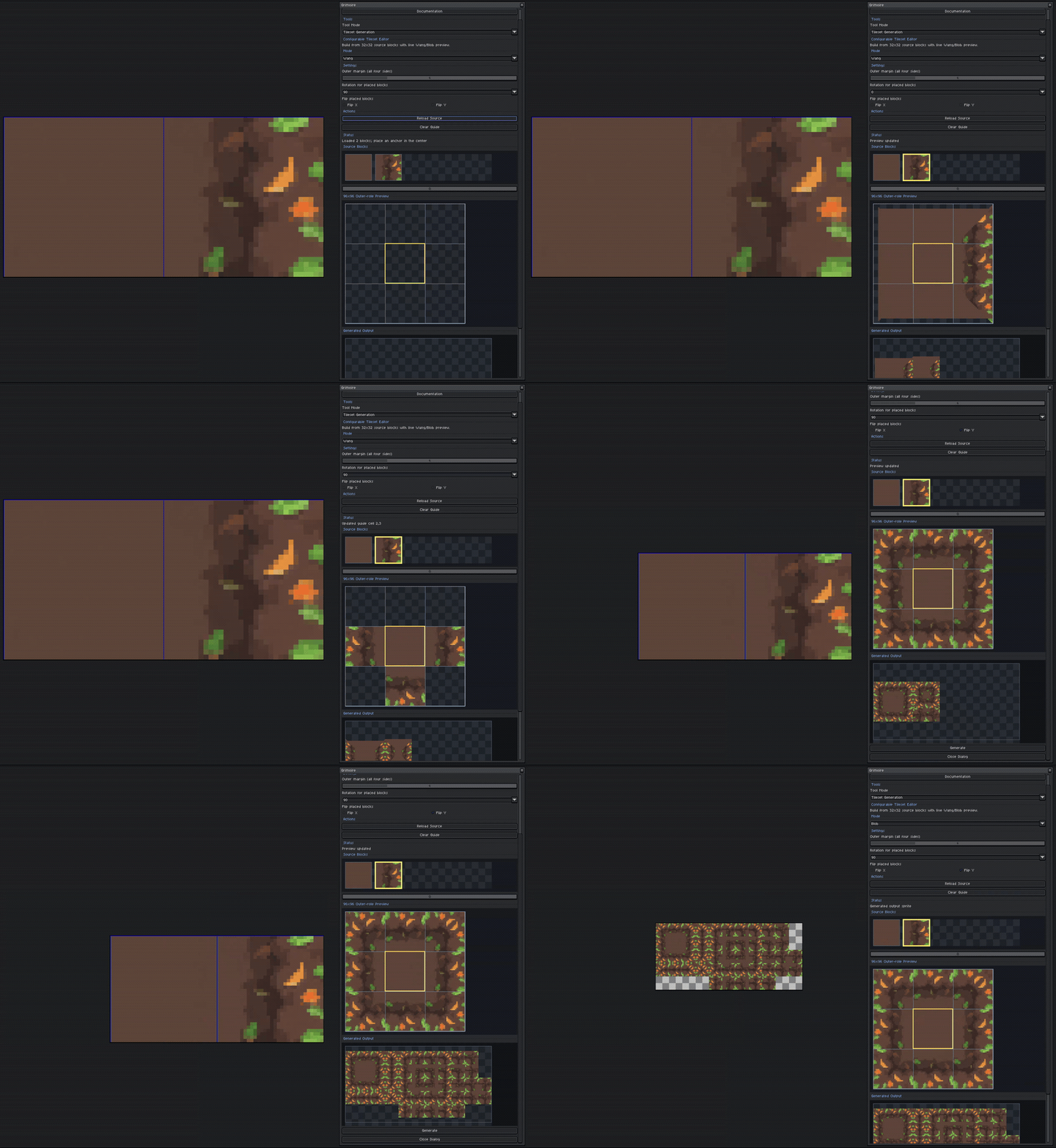
Choose Your Source Art
Open a sprite sheet made from 32x32 blocks, then select the artwork you want to use for each tile role.
Assign The Center, Edges And Corners
Place a center tile first, then add custom edge and corner blocks where you want more control. Unassigned roles are derived from the artwork already provided, so you can begin with a small source set and refine it as needed.
Transform Individual Placements
Rotate source blocks by 90-degree steps or flip them horizontally and vertically to reuse artwork across multiple directions.
Tune The Outer Margin
Adjust how far the center artwork extends into the outer edges to better match the shape and spacing of your terrain.
Preview Before Export
Switch between Wang and Blob modes and review the generated result inside the editor before opening it as a new Aseprite sprite.
Two Generation Modes
Wang
Generate a compact tile sheet for edge-and-corner terrain transitions. Wang output is 160x96 pixels.
Blob
Generate a larger set covering a broader range of connected-neighbour combinations. Blob output is 352x160 pixels.
Designed For Aseprite
The complete workflow runs from an Aseprite extension. The source sprite remains available while the finished tilemap opens as a new RGBA sprite, ready for editing, cleanup and export.
The plugin includes its own local backend. Python, ComfyUI, Grimoire and an internet connection are not required at runtime.
Plugin Scope
This standalone plugin focuses on Grimoire's tilemap generation workflow. It uses fixed 32x32 source blocks and generates Wang or Blob tile sheets from the roles you assign.
System Requirements
Windows
- Windows 10 or 11 (64-bit)
- 64-bit Intel or AMD processor
- Aseprite
macOS — Experimental. Functionality is not guaranteed and may vary across hardware.
- macOS 11 Big Sur or newer
- Apple Silicon or Intel processor
- Aseprite
Linux — Experimental. Functionality is not guaranteed and may vary across hardware.
- 64-bit Linux distribution
- 64-bit Intel or AMD processor
- Aseprite
Install the package matching your operating system and processor through Aseprite's Extensions preferences.
Download
Click download now to get access to the following files:
Development log
- Free Tilemap Generation Plugin2 days ago
Leave a comment
Log in with itch.io to leave a comment.